21
de Setembre
de
2015 - 11:06
It has been less then a week since Apple launched its new iOS 9 operating system for the iPhone and the iPad. While the company widely announced the main novelties, some of the smaller, and more interesting, functions have been overlooked. What follows is a quick run-down of them:
About the settings
With each new version of the iOS operating system, Apple adds more functions. Most of the new options can be configured, customised or even deactivated in the device's settings.
However, over time this section has become ever larger, so that it is now hard to find some of the options. So, to make life easier, Apple has added a search function at the top of the main settings screen.
So if for example we search for "Vibration", the results show all of the related configurable options for that feature.
Calls from Spotlight
A new shortcut in iOS 9 allows us to avoid having to enter the call or messaging app and search for a contact so as to call. message or FaceTime them.
Now all you have to do is open the phone's general search function (swiping the screen from top to bottom), begin writing the name of a contact and the results will show the call, message or video call icons.
At the same time, any notes related to this contact in the calendar are also shown.
Go back app
This new function may not seem very important, but it is actually very useful. Often iOS apps open other application to provide extra options –Whatsapp can open Google Maps, Twitter can open Youtube, and so on. Now, when that happens, the menu bar at the top with the time and the battery information is replaced by a "Go back" button allowing us to switch quickly between apps.
All you need to do is tap the button to return to the app you were using before.

Battery improvements
In this new version of iOS, Apple stresses battery conservation and optimisation. Thus, on the one hand, it has not only introduced information on the phone or tablet's battery usage, but also that of any connected devices –such as the Apple Watch– in the notification section.
On the other hand, in the phone's settings, there is a dedicated "Battery" section that allows us to activate energy-saving features, such as turning off background updates or certain screen effects, as well as a list that details the power consumption of the different apps installed on the phone.
App Switcher
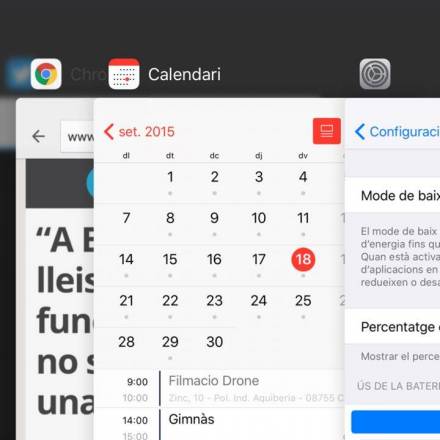
A more cosmetic change is to App Switcher, the mosaic of apps that appears after double tapping the phone or tablet's home button. In previous versions, the apps were presented in a line, with the icons for each application below the preview of the program in question.
Now, in iOS 9, Apple has changed the design to stack different screens on top of one another, displacing them to one side. It is a more visually appealing change, although it is also a little more confusing in terms of usability compared with the previous version.
About the settings
With each new version of the iOS operating system, Apple adds more functions. Most of the new options can be configured, customised or even deactivated in the device's settings.
However, over time this section has become ever larger, so that it is now hard to find some of the options. So, to make life easier, Apple has added a search function at the top of the main settings screen.
So if for example we search for "Vibration", the results show all of the related configurable options for that feature.
Calls from Spotlight
A new shortcut in iOS 9 allows us to avoid having to enter the call or messaging app and search for a contact so as to call. message or FaceTime them.
Now all you have to do is open the phone's general search function (swiping the screen from top to bottom), begin writing the name of a contact and the results will show the call, message or video call icons.
At the same time, any notes related to this contact in the calendar are also shown.
Go back app
This new function may not seem very important, but it is actually very useful. Often iOS apps open other application to provide extra options –Whatsapp can open Google Maps, Twitter can open Youtube, and so on. Now, when that happens, the menu bar at the top with the time and the battery information is replaced by a "Go back" button allowing us to switch quickly between apps.
All you need to do is tap the button to return to the app you were using before.
Battery improvements
In this new version of iOS, Apple stresses battery conservation and optimisation. Thus, on the one hand, it has not only introduced information on the phone or tablet's battery usage, but also that of any connected devices –such as the Apple Watch– in the notification section.
On the other hand, in the phone's settings, there is a dedicated "Battery" section that allows us to activate energy-saving features, such as turning off background updates or certain screen effects, as well as a list that details the power consumption of the different apps installed on the phone.
App Switcher
A more cosmetic change is to App Switcher, the mosaic of apps that appears after double tapping the phone or tablet's home button. In previous versions, the apps were presented in a line, with the icons for each application below the preview of the program in question.
Now, in iOS 9, Apple has changed the design to stack different screens on top of one another, displacing them to one side. It is a more visually appealing change, although it is also a little more confusing in terms of usability compared with the previous version.